Face-Hunter: Multi-Modal Entity Linking


A project that allows to create and query a knowledge graph of videos and their Dbpedia and Wikidata entities.
Table of Contents
Description
Entity linking allows leveraging information about named entities from a knowledge base.
This work shows that face recognition methods can be used to identify entities in videos such that users can formulate detailed queries with information from DBpedia and Wikidata. The focus of this project lies on videos from YouTube.
To address this issue we use publicity available thumbnails from DBpedia and Wikidata to create face-embeddings for a large number of celebrities using the Deepface library. Additionally, our project allows to scrape material from Google Images to represent entities in different scenes. Experiments have shown that recognition based on approximate k-nearest neighbors leads to the best balance between accuracy and runtime. Finally, the detected entities are used to build a knowledge graph based on the paper VidOnt: a core reference ontology for reasoning over video scenes which represents the links between videos, entities and timestamps. This gives the advantage of queries which include co-occurrences of actors or other video-related information. The figure below illustrates the structure of the generated graphs.
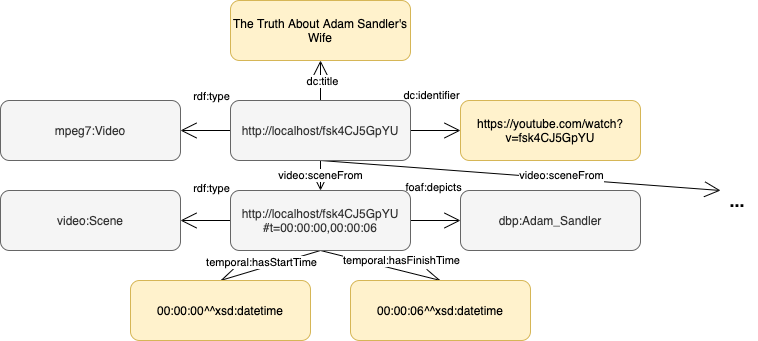
Using the YouTube Faces Database and YouTube Celebrities Face Tracking and Recognition Dataset we achieved an accuracy of X and X respectively. Scraping additional images improved the results to X and X. Evaluation steps for the IMDb-Face and IMDb-Wiki are implemented and allow future performance tests.
How to setup on Google Cloud
Follow these steps:
In the root folder create a ssh-key with an empty passphrase:
$ ssh-keygen -t rsa
Setup the cloud environment:
$  terraform init
$  terraform plan
$  terraform apply --auto-approve
Use the output IP-address to connect to the instance:
$ ssh-keygen -R IP_instance
$ ssh -i pub_key root@IP_instance
Run the app:
$ sudo docker run -v /mnt/face-hunter-bucket:/root/FACE-HUNTER/face-hunter-bucket --privileged -it facehunters/face-hunter /bin/bash
$ cd root/FACE-HUNTER
$ python cli.py ARGUMENTS
Destroy the instance when finished:
$ terraform destroy --auto-approve
How to use
The module can be imported and used directly in Python or by accessing the command line interface.
A detailed documentation can be found here.
Credits
This project started at the end of March 2021 as a Team Project at the University of Mannheim. The team consists of:
Contents: